
Optionnel : Automatisation : SetupComplete.cmd + InstallApps.ps1
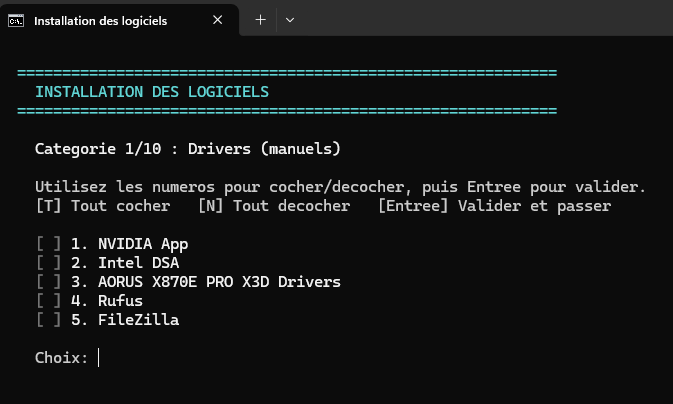
Au premier démarrage, un script interactif s'affiche proposant de choisir les packs de logiciels à installer. Chaque pack s'installe silencieusement via winget.
Structure des fichiers
Deux fichiers sont nécessaires :
SetupComplete.cmd: lanceur batch (appelé par autounattend.xml)InstallApps.ps1: script PowerShell interactif avec les packsFirstBootTweaks.ps1
Screenshot

SetupComplete.cmd
@echo off
setlocal enabledelayedexpansion
REM ============================================================
REM  SetupComplete.cmd - Lanceur du script d'installation
REM  Emplacement : C:\Windows\Setup\Scripts\SetupComplete.cmd
REM ============================================================

echo.
echo  ============================================
echo   Preparation de l'installation des logiciels
echo  ============================================
echo.

REM Attendre que le bureau soit bien charge
echo  Attente du chargement du systeme (10 secondes)...
timeout /t 10 /nobreak >nul

REM Determiner le dossier du script (pour trouver InstallApps.ps1 a cote)
set "SCRIPT_DIR=%~dp0"
echo  Dossier des scripts : %SCRIPT_DIR%

REM Verifier que InstallApps.ps1 existe
if not exist "%SCRIPT_DIR%InstallApps.ps1" (
    echo.
    echo  ERREUR : InstallApps.ps1 introuvable dans %SCRIPT_DIR%
    echo.
    pause
    exit /b 1
)

REM Ajouter le chemin WindowsApps au PATH (winget s'y trouve souvent)
set "PATH=%PATH%;%LOCALAPPDATA%\Microsoft\WindowsApps"

REM Verifier que winget est disponible (boucle max 2 minutes)
echo  Verification de winget...
set RETRY=0

:WAIT_WINGET
winget --version >nul 2>&1
if %ERRORLEVEL% equ 0 goto WINGET_OK

set /a RETRY+=1
if %RETRY% geq 12 (
    echo.
    echo  ERREUR : winget introuvable apres 2 minutes.
    echo  Installez-le via le Microsoft Store (App Installer).
    echo  Puis lancez manuellement :
    echo  powershell -ExecutionPolicy Bypass -File "%SCRIPT_DIR%InstallApps.ps1"
    echo.
    pause
    exit /b 1
)

echo  winget pas encore disponible, tentative !RETRY!/12 dans 10s...
timeout /t 10 /nobreak >nul
goto WAIT_WINGET

:WINGET_OK
echo  winget detecte !
echo.

REM Lancer les tweaks premier demarrage (taches planifiees, Defender, etc.)
if exist "%SCRIPT_DIR%FirstBootTweaks.ps1" (
    echo  Lancement de FirstBootTweaks.ps1...
    echo.
    powershell.exe -ExecutionPolicy Bypass -NoProfile -File "%SCRIPT_DIR%FirstBootTweaks.ps1"
    echo.
)

REM Lancer le script PowerShell interactif
echo  Lancement de InstallApps.ps1...
echo.
powershell.exe -ExecutionPolicy Bypass -NoProfile -File "%SCRIPT_DIR%InstallApps.ps1"

REM Capturer le code retour de PowerShell
if %ERRORLEVEL% neq 0 (
    echo.
    echo  ATTENTION : Le script PowerShell a retourne une erreur (code %ERRORLEVEL%).
    echo.
)

REM Supprimer le raccourci du Startup pour ne pas relancer au prochain login
del "%ProgramData%\Microsoft\Windows\Start Menu\Programs\Startup\SetupComplete.cmd" >nul 2>&1

echo.
echo  Script termine. Appuyez sur une touche pour fermer.
pause >nul
exit /b 0
Screenshot Installation des logiciels
InstallApps.ps1
<#
.SYNOPSIS
    Installation interactive des logiciels au premier demarrage via winget
#>

# Forcer encodage UTF-8
[Console]::OutputEncoding = [System.Text.Encoding]::UTF8
$Host.UI.RawUI.WindowTitle = "Installation des logiciels"

# ============================================================
# CONFIGURATION DES CATEGORIES ET APPLICATIONS
# ============================================================
$categories = [ordered]@{
    "Drivers (manuels)" = @{
        DefaultMode = "M"
        Apps = @(
            @{ Id = "MANUAL";  Name = "NVIDIA App";                Default = $false; Url = "https://www.nvidia.com/fr-fr/software/nvidia-app/" }
            @{ Id = "MANUAL";  Name = "Intel DSA";                  Default = $false; Url = "https://www.intel.fr/content/www/fr/fr/support/detect.html" }
            @{ Id = "MANUAL";  Name = "AORUS X870E PRO X3D Drivers"; Default = $false; Url = "https://www.aorus.com/fr-fr/motherboards/X870E-AORUS-PRO-X3D/Support" }
            @{ Id = "MANUAL";  Name = "Rufus";                      Default = $false; Url = "https://rufus.ie/fr/" }
            @{ Id = "MANUAL";  Name = "FileZilla";                  Default = $false; Url = "https://filezilla-project.org/download.php?type=client" }
        )
    }
    "Navigateurs" = @{
        DefaultMode = "S"
        Apps = @(
            @{ Id = "Brave.Brave";              Name = "Brave";                Default = $false }
            @{ Id = "Mozilla.Firefox";          Name = "Firefox";              Default = $true }
            @{ Id = "eloston.ungoogled-chromium"; Name = "Chromium (ungoogled)"; Default = $false }
            @{ Id = "TheBrowserCompany.Arc";    Name = "Arc";                  Default = $false }
        )
    }
    "Compression" = @{
        DefaultMode = "S"
        Apps = @(
            @{ Id = "7zip.7zip";                Name = "7-Zip";                Default = $true }
        )
    }
    "Jeux" = @{
        DefaultMode = "I"
        Apps = @(
            @{ Id = "ElectronicArts.EADesktop"; Name = "EA App";               Default = $false }
            @{ Id = "EpicGames.EpicGamesLauncher"; Name = "Epic Games";        Default = $false }
            @{ Id = "Valve.Steam";              Name = "Steam";                Default = $false }
        )
    }
    "Utilitaires" = @{
        DefaultMode = "S"
        Apps = @(
            @{ Id = "CPUID.CPU-Z";              Name = "CPU-Z";               Default = $false }
            @{ Id = "TechPowerUp.GPU-Z";        Name = "GPU-Z";               Default = $false }
            @{ Id = "Wagnardsoft.DisplayDriverUninstaller"; Name = "DDU";      Default = $false }
            @{ Id = "REALiX.HWiNFO";            Name = "HWiNFO";              Default = $false }
            @{ Id = "DominikReichl.KeePass";     Name = "KeePass";             Default = $false }
            @{ Id = "Microsoft.PowerToys";       Name = "PowerToys";           Default = $false }
            @{ Id = "JAMSoftware.TreeSize.Free"; Name = "TreeSize Free";       Default = $false }
        )
    }
    "ProTools IT" = @{
        DefaultMode = "S"
        Apps = @(
            @{ Id = "WiresharkFoundation.Wireshark"; Name = "Wireshark";       Default = $false }
            @{ Id = "WireGuard.WireGuard";           Name = "WireGuard";       Default = $false }
            @{ Id = "PuTTY.PuTTY";                   Name = "PuTTY";           Default = $false }
            @{ Id = "WinSCP.WinSCP";                 Name = "WinSCP";          Default = $false }
            @{ Id = "Mobatek.MobaXterm";             Name = "MobaXterm";       Default = $false }
            @{ Id = "Insecure.Nmap";                 Name = "Nmap";            Default = $false }
            @{ Id = "Bitwarden.Bitwarden";           Name = "Bitwarden";       Default = $false }
            @{ Id = "angryziber.AngryIPScanner";     Name = "Angry IP Scanner"; Default = $false }
        )
    }
    "Multimedia" = @{
        DefaultMode = "I"
        Apps = @(
            @{ Id = "Spotify.Spotify";           Name = "Spotify";             Default = $false }
            @{ Id = "darktable.darktable";       Name = "Darktable";           Default = $false }
            @{ Id = "VideoLAN.VLC";              Name = "VLC";                 Default = $true }
            @{ Id = "Plex.Plex";                 Name = "Plex";                Default = $false }
            @{ Id = "OBSProject.OBSStudio";      Name = "OBS Studio";           Default = $false }
            @{ Id = "HandBrake.HandBrake";       Name = "HandBrake";            Default = $false }
        )
    }
    "Communication" = @{
        DefaultMode = "S"
        Apps = @(
            @{ Id = "Discord.Discord";           Name = "Discord";             Default = $false }
            @{ Id = "OpenWhisperSystems.Signal";  Name = "Signal";              Default = $false }
            @{ Id = "SlackTechnologies.Slack";   Name = "Slack";               Default = $false }
            @{ Id = "Telegram.TelegramDesktop";  Name = "Telegram";            Default = $false }
            @{ Id = "Microsoft.Teams";           Name = "Teams";               Default = $false }
        )
    }
    "Documents" = @{
        DefaultMode = "S"
        Apps = @(
            @{ Id = "Adobe.Acrobat.Reader.64-bit"; Name = "Adobe Reader";     Default = $true }
            @{ Id = "ToEverything.AFFiNE";         Name = "Affine";             Default = $false }
            @{ Id = "Logseq.Logseq";              Name = "LogSeq";             Default = $false }
            @{ Id = "TheDocumentFoundation.LibreOffice"; Name = "LibreOffice"; Default = $false }
        )
    }
    "Developpement" = @{
        DefaultMode = "I"
        Apps = @(
            @{ Id = "Docker.DockerDesktop";            Name = "Docker Desktop";       Default = $false }
            @{ Id = "Notepad++.Notepad++";             Name = "Notepad++";            Default = $true }
            @{ Id = "Microsoft.VisualStudioCode";      Name = "VS Code";              Default = $false }
            @{ Id = "Microsoft.VisualStudio.2022.Community"; Name = "Visual Studio 2022"; Default = $false }
            @{ Id = "Git.Git";                         Name = "Git";                  Default = $false }
            @{ Id = "GitHub.GitHubDesktop";            Name = "GitHub Desktop";       Default = $false }
            @{ Id = "GitHub.cli";                      Name = "GitHub CLI";           Default = $false }
            @{ Id = "Python.Python.3.12";              Name = "Python 3.12";          Default = $false }
        )
    }
}

# Option speciale WSL2 (feature Windows, pas winget)
$installWSL = $false

# ============================================================
# FONCTIONS D AFFICHAGE
# ============================================================

function Show-Header {
    param([string]$Title)
    Clear-Host
    Write-Host ""
    Write-Host "  ============================================================" -ForegroundColor Cyan
    Write-Host "    INSTALLATION DES LOGICIELS" -ForegroundColor Cyan
    Write-Host "  ============================================================" -ForegroundColor Cyan
    Write-Host ""
    Write-Host "    $Title" -ForegroundColor White
    Write-Host ""
}

function Show-CategoryMenu {
    param(
        [string]$CategoryName,
        [int]$CategoryIndex,
        [int]$TotalCategories,
        [array]$Apps,
        [array]$Selected
    )

    Show-Header "Categorie $CategoryIndex/$TotalCategories : $CategoryName"

    Write-Host "    Utilisez les numeros pour cocher/decocher, puis Entree pour valider." -ForegroundColor Gray
    Write-Host "    [T] Tout cocher   [N] Tout decocher   [Entree] Valider et passer" -ForegroundColor Gray
    Write-Host ""

    for ($i = 0; $i -lt $Apps.Count; $i++) {
        if ($Selected[$i]) {
            $check = "[X]"
            $color = "Green"
        } else {
            $check = "[ ]"
            $color = "DarkGray"
        }
        Write-Host "    $check " -ForegroundColor $color -NoNewline
        Write-Host "$($i + 1). $($Apps[$i].Name)" -ForegroundColor White
    }

    # Cas special : categorie Developpement - proposer WSL2
    if ($CategoryName -eq "Developpement") {
        Write-Host ""
        if ($script:installWSL) {
            $wslCheck = "[X]"
            $wslColor = "Green"
        } else {
            $wslCheck = "[ ]"
            $wslColor = "DarkGray"
        }
        Write-Host "    $wslCheck " -ForegroundColor $wslColor -NoNewline
        Write-Host "W. WSL2 (feature Windows - necessite un redemarrage)" -ForegroundColor Yellow
    }

    Write-Host ""
}

# ============================================================
# PARCOURS SEQUENTIEL : CATEGORIE PAR CATEGORIE
# ============================================================

$allSelections = @{}
$categoryNames = @($categories.Keys)
$totalCat = $categoryNames.Count

for ($catIdx = 0; $catIdx -lt $totalCat; $catIdx++) {

    $catName = $categoryNames[$catIdx]
    $catConfig = $categories[$catName]
    $apps = $catConfig.Apps
    $defaultMode = $catConfig.DefaultMode

    # Initialiser la selection avec les valeurs par defaut
    $selected = @()
    foreach ($app in $apps) {
        $selected += $app.Default
    }

    # ---- Boucle : selection des apps ----
    $done = $false
    while (-not $done) {

        Show-CategoryMenu -CategoryName $catName `
                          -CategoryIndex ($catIdx + 1) `
                          -TotalCategories $totalCat `
                          -Apps $apps `
                          -Selected $selected

        $userInput = Read-Host "    Choix"

        switch ($userInput.ToUpper()) {
            "T" {
                for ($i = 0; $i -lt $selected.Count; $i++) { $selected[$i] = $true }
                if ($catName -eq "Developpement") { $script:installWSL = $true }
            }
            "N" {
                for ($i = 0; $i -lt $selected.Count; $i++) { $selected[$i] = $false }
                if ($catName -eq "Developpement") { $script:installWSL = $false }
            }
            "W" {
                if ($catName -eq "Developpement") {
                    $script:installWSL = -not $script:installWSL
                }
            }
            "" {
                $done = $true
            }
            default {
                $nums = $userInput -split '[,\s]+' | Where-Object { $_ -match '^\d+$' }
                foreach ($num in $nums) {
                    $idx = [int]$num - 1
                    if ($idx -ge 0 -and $idx -lt $selected.Count) {
                        $selected[$idx] = -not $selected[$idx]
                    }
                }
            }
        }
    }

    # ---- Choix du mode (si au moins 1 app cochee et pas mode Manuel) ----
    $hasSelection = ($selected | Where-Object { $_ -eq $true }).Count -gt 0
    $chosenMode = $defaultMode

    if ($hasSelection -and $defaultMode -ne "M") {
        if ($defaultMode -eq "S") {
            $modeLabel = "Silencieux"
        } else {
            $modeLabel = "Interactif"
        }
        Write-Host ""
        Write-Host "    Mode d installation pour ${catName} ?" -ForegroundColor White
        Write-Host "    [S] Silencieux - automatique, chemin par defaut sur C:\" -ForegroundColor Gray
        Write-Host "    [I] Interactif - installeur s ouvre, vous choisissez le chemin" -ForegroundColor Gray
        Write-Host ""
        $modeInput = Read-Host "    Choix (par defaut: $modeLabel)"

        if ($modeInput.ToUpper() -eq "I") {
            $chosenMode = "I"
        } elseif ($modeInput.ToUpper() -eq "S") {
            $chosenMode = "S"
        }
    }

    # Sauvegarder
    $allSelections[$catName] = @{
        Apps     = $apps
        Selected = $selected
        Mode     = $chosenMode
    }
}

# ============================================================
# RECAPITULATIF AVANT INSTALLATION
# ============================================================

Show-Header "RECAPITULATIF - Verification avant installation"

$appsToInstall = @()

foreach ($catName in $categoryNames) {
    $sel = $allSelections[$catName]
    $selectedApps = @()

    for ($i = 0; $i -lt $sel.Apps.Count; $i++) {
        if ($sel.Selected[$i]) {
            $selectedApps += $sel.Apps[$i]
            $appEntry = @{
                Id   = $sel.Apps[$i].Id
                Name = $sel.Apps[$i].Name
                Mode = $sel.Mode
                Cat  = $catName
            }
            if ($sel.Apps[$i].Url) { $appEntry.Url = $sel.Apps[$i].Url }
            $appsToInstall += $appEntry
        }
    }

    if ($selectedApps.Count -gt 0) {
        if ($sel.Mode -eq "M") {
            $modeTag = " [MANUEL - liens de telechargement]"
            $modeColor = "Magenta"
        } elseif ($sel.Mode -eq "I") {
            $modeTag = " [INTERACTIF]"
            $modeColor = "Yellow"
        } else {
            $modeTag = " [SILENCIEUX]"
            $modeColor = "Gray"
        }
        Write-Host "    $catName" -ForegroundColor Cyan -NoNewline
        Write-Host $modeTag -ForegroundColor $modeColor
        foreach ($app in $selectedApps) {
            if ($sel.Mode -eq "M") {
                $url = ($sel.Apps | Where-Object { $_.Name -eq $app.Name }).Url
                Write-Host "      - $($app.Name) : $url" -ForegroundColor Magenta
            } else {
                Write-Host "      - $($app.Name)" -ForegroundColor Green
            }
        }
    } else {
        Write-Host "    $catName : (aucune)" -ForegroundColor DarkGray
    }
}

if ($installWSL) {
    Write-Host "    WSL2 : Oui (necessite redemarrage)" -ForegroundColor Yellow
}

Write-Host ""
Write-Host "    Total : $($appsToInstall.Count) application(s) a installer" -ForegroundColor White

if ($installWSL) {
    Write-Host "           + WSL2 (feature Windows)" -ForegroundColor Yellow
}

Write-Host ""
$confirm = Read-Host "    Lancer installation ? (O/N)"

if ($confirm -ne "O" -and $confirm -ne "o") {
    Write-Host ""
    Write-Host "    Installation annulee." -ForegroundColor Red
    Write-Host "    Vous pourrez relancer le script depuis :" -ForegroundColor Gray
    Write-Host "    C:\Windows\Setup\Scripts\InstallApps.ps1" -ForegroundColor Gray
    Write-Host ""
    Write-Host "    Appuyez sur une touche..." -ForegroundColor DarkGray
    $null = $Host.UI.RawUI.ReadKey("NoEcho,IncludeKeyDown")
    exit
}

# ============================================================
# INSTALLATION
# ============================================================

Show-Header "INSTALLATION EN COURS..."

# Verifier que winget est disponible
Write-Host "    Verification de winget..." -ForegroundColor Gray
$wingetCheck = Get-Command winget -ErrorAction SilentlyContinue
if (-not $wingetCheck) {
    Write-Host "    winget non disponible, attente 30 secondes..." -ForegroundColor Yellow
    Start-Sleep -Seconds 30
    $wingetCheck = Get-Command winget -ErrorAction SilentlyContinue
    if (-not $wingetCheck) {
        Write-Host "    ERREUR : winget introuvable. Installez-le via le Microsoft Store" -ForegroundColor Red
        Write-Host "    (App Installer / Programme d installation d application)" -ForegroundColor Red
        Write-Host ""
        Write-Host "    Appuyez sur une touche..." -ForegroundColor DarkGray
        $null = $Host.UI.RawUI.ReadKey("NoEcho,IncludeKeyDown")
        exit 1
    }
}
Write-Host "    winget OK" -ForegroundColor Green
Write-Host ""

$installed = 0
$failed = @()
$total = $appsToInstall.Count
$currentCat = ""

for ($i = 0; $i -lt $total; $i++) {
    $app = $appsToInstall[$i]
    $progress = "[$($i + 1)/$total]"

    # Afficher le nom de la categorie quand on change
    if ($app.Cat -ne $currentCat) {
        $currentCat = $app.Cat
        if ($app.Mode -eq "M") { $modeTag = "manuel" }
        elseif ($app.Mode -eq "I") { $modeTag = "interactif" }
        else { $modeTag = "silencieux" }
        Write-Host ""
        Write-Host "    === $currentCat ($modeTag) ===" -ForegroundColor Cyan
    }

    if ($app.Mode -eq "M") {
        # MODE MANUEL : ouvrir le lien dans le navigateur
        Write-Host "    $progress $($app.Name) - ouverture du lien..." -ForegroundColor Magenta
        Write-Host "           $($app.Url)" -ForegroundColor Gray
        Start-Process $app.Url
        $installed++
        Start-Sleep -Seconds 2

    } elseif ($app.Mode -eq "I") {
        # MODE INTERACTIF : installeur s ouvre, le technicien choisit le chemin
        Write-Host "    $progress $($app.Name) - installeur interactif..." -ForegroundColor Yellow
        Write-Host "           Suivez les instructions." -ForegroundColor Gray

        $result = winget install --id $app.Id --interactive --force --accept-package-agreements --accept-source-agreements 2>&1
    } else {
        # MODE SILENCIEUX : tout automatique
        Write-Host "    $progress Installation de $($app.Name)..." -ForegroundColor Yellow -NoNewline

        $result = winget install --id $app.Id --silent --force --accept-package-agreements --accept-source-agreements 2>&1
    }

    if ($app.Mode -ne "M") {
        if ($LASTEXITCODE -eq 0) {
            if ($app.Mode -eq "I") {
                Write-Host "           OK" -ForegroundColor Green
            } else {
                Write-Host " OK" -ForegroundColor Green
            }
            $installed++
        } else {
            if ($app.Mode -eq "I") {
                Write-Host "           ECHEC" -ForegroundColor Red
            } else {
                Write-Host " ECHEC" -ForegroundColor Red
            }
            $failed += $app
        }
    }
}

# WSL2
if ($installWSL) {
    Write-Host ""
    Write-Host "    Activation de WSL2..." -ForegroundColor Yellow
    wsl --install --no-distribution 2>&1
    Write-Host "    WSL2 active. Un redemarrage sera necessaire." -ForegroundColor Yellow
    Write-Host "    Apres redemarrage, lancez : wsl --install -d Ubuntu" -ForegroundColor Yellow
}

# ============================================================
# RESUME FINAL
# ============================================================

Write-Host ""
Write-Host "  ============================================================" -ForegroundColor Cyan
Write-Host "    INSTALLATION TERMINEE" -ForegroundColor Cyan
Write-Host "  ============================================================" -ForegroundColor Cyan
Write-Host ""
Write-Host "    Installees avec succes : $installed / $total" -ForegroundColor Green

if ($failed.Count -gt 0) {
    Write-Host ""
    Write-Host "    En echec :" -ForegroundColor Red
    foreach ($app in $failed) {
        Write-Host "      - $($app.Name)  (winget install --id $($app.Id))" -ForegroundColor Red
    }
    Write-Host ""
    Write-Host "    Pour reinstaller les echecs, copiez la commande ci-dessus." -ForegroundColor Gray
}

if ($installWSL) {
    Write-Host ""
    Write-Host "    WSL2 : Redemarrage necessaire pour finaliser." -ForegroundColor Yellow
}

Write-Host ""
Write-Host "    Appuyez sur une touche pour fermer..." -ForegroundColor DarkGray
$null = $Host.UI.RawUI.ReadKey("NoEcho,IncludeKeyDown")
FirstBootTweaks.ps1
<#
.SYNOPSIS
Desactivation des taches planifiees de telemetrie et tweaks premier boot
.DESCRIPTION
Ces modifications ne peuvent pas etre appliquees sur une image offline (WIM).
Ce script doit etre execute une fois au premier demarrage, en tant qu'administrateur.
Il est appele automatiquement par SetupComplete.cmd AVANT InstallApps.ps1
.NOTES
Emplacement : C:\Windows\Setup\Scripts\FirstBootTweaks.ps1
#>
Write-Host ""
Write-Host " ============================================" -ForegroundColor Cyan
Write-Host " TWEAKS PREMIER DEMARRAGE" -ForegroundColor Cyan
Write-Host " ============================================" -ForegroundColor Cyan
Write-Host ""
# ============================================================
# 1. TACHES PLANIFIEES DE TELEMETRIE
# ============================================================
Write-Host " Desactivation des taches planifiees de telemetrie..." -ForegroundColor Yellow
$tasksToDisable = @(
# Customer Experience Improvement Program
"\Microsoft\Windows\Customer Experience Improvement Program\Consolidator"
"\Microsoft\Windows\Customer Experience Improvement Program\UsbCeip"
"\Microsoft\Windows\Customer Experience Improvement Program\KernelCeipTask"
# Application Experience (compatibilite / telemetrie)
"\Microsoft\Windows\Application Experience\Microsoft Compatibility Appraiser"
"\Microsoft\Windows\Application Experience\ProgramDataUpdater"
"\Microsoft\Windows\Application Experience\StartupAppTask"
"\Microsoft\Windows\Application Experience\MareBackup"
# Autochk
"\Microsoft\Windows\Autochk\Proxy"
# Diagnostic (DiskDiagnostic, etc.)
"\Microsoft\Windows\DiskDiagnostic\Microsoft-Windows-DiskDiagnosticDataCollector"
# Cloud Experience Host
"\Microsoft\Windows\CloudExperienceHost\CreateObjectTask"
# Feedback
"\Microsoft\Windows\Feedback\Siuf\DmClient"
"\Microsoft\Windows\Feedback\Siuf\DmClientOnScenarioDownload"
# Maps
"\Microsoft\Windows\Maps\MapsUpdateTask"
"\Microsoft\Windows\Maps\MapsToastTask"
# Windows Error Reporting
"\Microsoft\Windows\Windows Error Reporting\QueueReporting"
)
$disabled = 0
foreach ($task in $tasksToDisable) {
$exists = schtasks /Query /TN $task 2>$null
if ($exists) {
schtasks /Change /TN $task /Disable 2>$null | Out-Null
if ($LASTEXITCODE -eq 0) {
$taskName = $task.Split('\')[-1]
Write-Host " OK : $taskName" -ForegroundColor Green
$disabled++
}
}
}
Write-Host " $disabled tache(s) desactivee(s)" -ForegroundColor Gray
# ============================================================
# 2. DEFENDER - DESACTIVER L'ENVOI AUTOMATIQUE D'ECHANTILLONS
# ============================================================
Write-Host ""
Write-Host " Desactivation envoi automatique Defender..." -ForegroundColor Yellow
try {
Set-MpPreference -SubmitSamplesConsent 2 -ErrorAction SilentlyContinue
Write-Host " OK : SubmitSamplesConsent = 2 (Never Send)" -ForegroundColor Green
} catch {
Write-Host " SKIP : Defender non disponible" -ForegroundColor DarkGray
}
# ============================================================
# 3. SVCHOST SPLIT THRESHOLD (REDUIT LES PROCESSUS SVCHOST)
# ============================================================
Write-Host ""
Write-Host " Optimisation SvcHost Split Threshold..." -ForegroundColor Yellow
try {
$memory = (Get-CimInstance Win32_PhysicalMemory | Measure-Object Capacity -Sum).Sum / 1KB
Set-ItemProperty -Path "HKLM:\SYSTEM\CurrentControlSet\Control" -Name "SvcHostSplitThresholdInKB" -Value ([int]$memory) -Type DWord
$memGB = [math]::Round($memory / 1048576, 1)
Write-Host " OK : Seuil regle sur $memGB Go de RAM" -ForegroundColor Green
} catch {
Write-Host " SKIP : Impossible de lire la RAM" -ForegroundColor DarkGray
}
# ============================================================
# 4. SUPPRIMER LE FICHIER HIBERNATION (LIBERE ~3-8 Go)
# ============================================================
Write-Host ""
Write-Host " Suppression fichier hibernation..." -ForegroundColor Yellow
powercfg /h off 2>$null
if ($LASTEXITCODE -eq 0) {
Write-Host " OK : hiberfil.sys supprime" -ForegroundColor Green
} else {
Write-Host " SKIP : Hibernation deja desactivee" -ForegroundColor DarkGray
}
Write-Host ""
Write-Host " === TWEAKS PREMIER DEMARRAGE TERMINES ===" -ForegroundColor Green
Write-Host ""
Placer les fichiers dans l'ISO
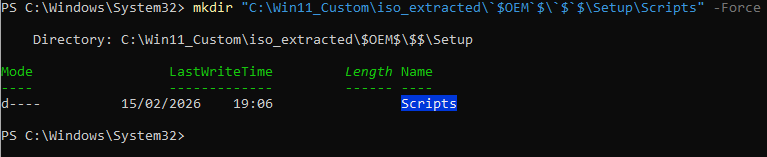
Les fichiers doivent être placés dans le dossier $OEM$ de l'ISO. Ce dossier spécial est copié automatiquement par l'installateur Windows dans C:\Windows\Setup\Scripts\ lors de l'installation.
# Créer le dossier $OEM$
mkdir "C:\Win11_Custom\iso_extracted\`$OEM`$\`$`$\Setup\Scripts" -Force

# Copier les scripts
copy C:\SetupComplete.cmd "C:\Win11_Custom\iso_extracted\`$OEM`$\`$`$\Setup\Scripts\"
copy C:\InstallApps.ps1 "C:\Win11_Custom\iso_extracted\`$OEM`$\`$`$\Setup\Scripts\"
copy C:\FirstBootTweaks.ps1 "C:\Win11_Custom\iso_extracted\`$OEM`$\`$`$\Setup\Scripts\"
Screenshot

Vérifier la structure
dir "C:\Win11_Custom\iso_extracted\`$OEM`$\`$`$\Setup\Scripts\"Screenshot
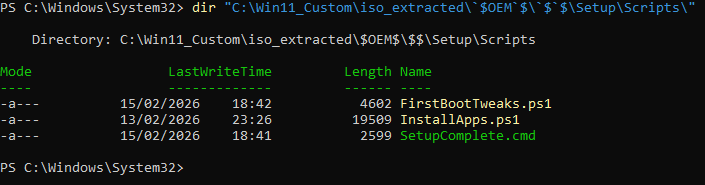
Vous devez voir SetupComplete.cmd,InstallApps.ps1, FirstbootTweaks.ps1